How to use BTD-EmisPred
Convert molecule structure to SMILES
Draw the molecule in ChemDraw, select the structure, then choose Edit > Copy As > SMILES.
Paste SMILES into the prediction box
Use one valid molecule SMILES for each prediction. Paste the copied text into the SMILES box on the Prediction page.
Input or select solvent
Choose the solvent that matches your experimental conditions from the solvent list, or enter its label. Use the abbreviation table below as a reference.
Click Predict and read the result
Click Predict after entering both SMILES and solvent. The estimated emission wavelength appears in the result panel in nanometers (nm).
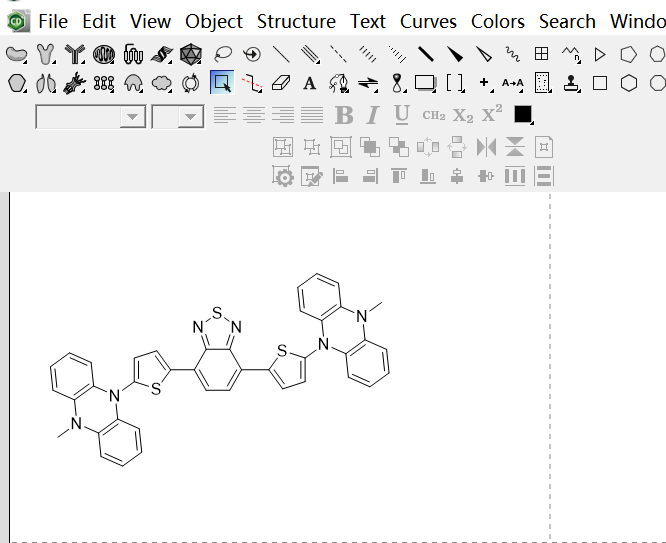
Draw the molecule structure in ChemDraw.
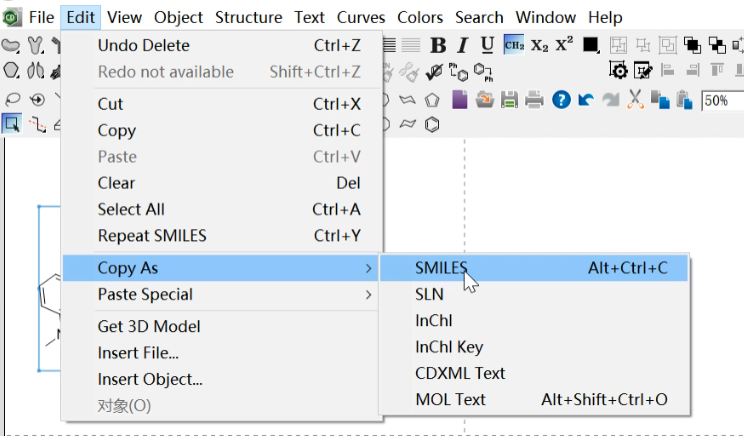
Select the molecule and copy it as SMILES.

Input or choose a solvent label from common solvents.

After prediction, the emission wavelength is shown in nm.
Solvent abbreviations
Please note that only the following solvents use abbreviations:
| Abbreviation | Full Name |
|---|---|
| THF | Tetrahydrofuran |
| DCM | Dichloromethane |
| TOL (PHME) | Toluene |
| H2O | Water |
| DMSO | Dimethyl sulfoxide |
| MEOH | Methanol |
| ACN | Acetonitrile |
| CFM (TCM) | Chloroform |
| HEX | n-Hexane |
| ETOH | Ethanol |
| VAC | Vinyl acetate |
| ACOET | Ethyl acetate |
| CHX | Cyclohexane |
| DMF | N,N-Dimethylformamide |
| DIOX | 1,4-Dioxane |
| AC | Acetone |
| IPROPOH (IPA) | Isopropanol |
| CBZN | Chlorobenzene |
| BZN | Benzene |
| SOLID | Solid state |
| THF/H2O | THF-Water mixture |
| PBS | Phosphate buffered saline |
| BZNIT | Benzonitrile |
| DCE | 1,2-Dichloroethane |
| BLUME | Butyl methyl ether |
| DEE | Diethyl ether |
| MXYLENE | m-Xylene |
Understanding results and input errors
The displayed wavelength is an estimate. Compare it with measurements taken under the same solvent and sample conditions. Changes in solvent, aggregation or sample state can affect emission; a prediction does not replace an experimental measurement.
If SMILES or solvent is missing, fill in both fields. If an invalid SMILES message appears, check the molecular structure and copy its SMILES again. For a prediction failure, read the displayed message before trying again.
A solvent warning means the entered condition is not fully represented in the prediction. Check the solvent label and choose the matching option when available. Treat results for unrecognized solvents with caution.
Please let us know your molecule, solvent, and optical properties by sending an email to gaowen@sdnu.edu.cn. Your experimental records can support the continued development of the database.